Build Your First MCP Server: Code Tips in Claude and Slack
MCP (Model Context Protocol) is the standard connector between AI clients and external tools. I built a server from scratch in 78 lines. Result: my coding tips repo, searchable inside Claude Code and a Slack slash command, using the same server.
Before MCP, connecting an AI assistant to your own data meant one-off integrations (a custom plugin, a pasted prompt). MCP defines a shared protocol, so you write the server once and any compliant client can use it.
A server exposes three kinds of things:
- Tools: functions Claude can call (search, get a specific tip, list categories)
- Resources: data Claude can browse (a full index of all tips)
- Prompts: suggested workflows (pre-written instructions for common tasks)
You don't need all three. For a tips collection, tools are enough.
Here's how Claude Code connects to an MCP server:
┌─────────────────────────────────────────────────────┐
│                   Claude Code                       │
│  You type: "search my tips for generators"          │
└──────────────────────┬──────────────────────────────┘
                       │ MCP protocol (JSON-RPC / stdio)
                       ▼
┌─────────────────────────────────────────────────────┐
│              MCP Server (server.py)                 │
│                                                     │
│  Tools:    search_tips(query)                       │
│            get_tip(tip_id)                          │
│  Resource: tips://all                               │
│                                                     │
│  Data: ~/code/bobcodesit/notes/*.md  (240 files)    │
└─────────────────────────────────────────────────────┘
Claude Code launches the server as a subprocess and communicates over stdin/stdout. Claude discovers your tools at startup and calls them whenever the conversation warrants it.
The data: my Python tip collection
My bobcodesit repo is a good candidate. It holds 240 markdown files in the notes/ subfolder. Each one looks like this:
# divmod built-in

Ever needed both integer division and remainder?
Use Python's `divmod()` built-in — it returns both in one go.

```python
>>> minutes, seconds = divmod(133, 60)
>>> minutes, seconds
(2, 13)
```

#built-ins
The structure is consistent: title on line one, body in the middle, one or more #hashtags at the end. That predictability makes parsing trivial.
Building the MCP server
First, clone the tips repo so the notes are on your machine:
# assuming a code directory in your home folder
cd ~/code
git clone [email protected]:bbelderbos/bobcodesit.git
Then set up the MCP server project:
mkdir tips-mcp && cd tips-mcp
uv init
uv add mcp
Create server.py:
import json
import random
import re
from functools import cache
from pathlib import Path

from mcp.server.fastmcp import FastMCP

NOTES_DIR = Path.home() / "code/bobcodesit/notes"

mcp = FastMCP("code-tips")


@cache
def load_notes() -> list[dict]:
    notes = []
    for path in sorted(NOTES_DIR.glob("*.md")):
        lines = path.read_text().strip().splitlines()
        title = lines[0].lstrip("# ").strip()
        tag_line = lines[-1] if lines[-1].startswith("#") else ""
        tags = [t.lstrip("#") for t in tag_line.split() if t.startswith("#")]
        content_lines = lines[1:-1] if tag_line else lines[1:]
        body = "\n".join(content_lines).strip()
        notes.append({"id": path.stem, "title": title, "tags": tags, "body": body})
    return notes


@mcp.tool()
def search_tips(query: str, limit: int = 10) -> list[dict]:
    """Search code tips by keyword. Pass a single short keyword (e.g. 'generator', 'decorator', 'contextmanager'), not a full sentence. Returns up to `limit` matching tips with id, title, and tags. Use get_tip to fetch the full body of a specific tip."""
    pattern = re.compile(rf"\b{re.escape(query.lower())}\b")
    results = [
        {"id": n["id"], "title": n["title"], "tags": n["tags"]}
        for n in load_notes()
        if pattern.search(n["title"].lower())
        or pattern.search(n["body"].lower())
        or any(pattern.search(t) for t in n["tags"])
    ]
    return results[:limit]


@mcp.tool()
def random_tip(tag: str = "") -> dict:
    """Return a random tip, optionally filtered by tag (e.g. 'built-ins', 'generators', 'decorators')."""
    notes = load_notes()
    if tag:
        t = tag.lower().lstrip("#")
        notes = [n for n in notes if any(t in note_tag for note_tag in n["tags"])]
    if not notes:
        return {"error": f"No tips found for tag: {tag}"}
    return random.choice(notes)


@mcp.tool()
def get_tip(tip_id: str) -> dict:
    """Get the full content of a single tip by its filename (without .md)."""
    path = NOTES_DIR / f"{tip_id}.md"
    if not path.exists():
        return {"error": f"Tip not found: {tip_id}"}
    lines = path.read_text().strip().splitlines()
    return {
        "id": tip_id,
        "title": lines[0].lstrip("# ").strip(),
        "body": "\n".join(lines[1:]).strip(),
    }


@mcp.resource("tips://all")
def all_tips() -> str:
    """Browse all tips: IDs, titles, and tags."""
    return json.dumps(
        [{"id": n["id"], "title": n["title"], "tags": n["tags"]} for n in load_notes()],
        indent=2,
    )


if __name__ == "__main__":
    mcp.run()
@cache from functools memoises the result of the first call and returns it on every subsequent call, no global variable needed. The notes are only read from disk once per server lifetime.
A few design decisions worth explaining:
-
search_tipsreturns onlyid,title, andtags, no body. Claude uses this summary list to decide which tip is most relevant, then callsget_tipto fetch the full content. Returning bodies for all matches at once can easily overflow the context window (a broad query like "ast" matches dozens of tips that all contain the substring). The two-phase pattern (search for summaries, then fetch the one you need) keeps responses small and Claude's reasoning sharp. -
random_tipaccepts an optional tag filter, so "give me a random built-in tip" becomes a direct call torandom_tip(tag="built-ins")rather than a broad search. Word-boundary matching insearch_tips(usingre.compile(r"\bquery\b")) prevents false positives where short queries match as substrings inside unrelated words. -
Tool results go to Claude, not directly to the user. Claude reads the structured dicts and decides how to present them. That's why the tools return raw data rather than formatted strings. Claude handles the formatting for the conversation context.
Test it standalone before wiring it up:
uv run python server.pyNo output is good. This means the server is waiting for a client to connect over stdio.
Register with Claude Code
You can add the MCP server with:
claude mcp add --scope user code-tips -- uv --project /path/to/tips-mcp run python /path/to/tips-mcp/server.py--scope user registers it in ~/.claude.json so it's available across all your projects. For a per-project setup instead, add a .mcp.json file in the project root:
{
  "mcpServers": {
    "code-tips": {
      "type": "stdio",
      "command": "uv",
      "args": ["--project", "/path/to/tips-mcp", "run", "python", "/path/to/tips-mcp/server.py"]
    }
  }
}
Restart Claude Code. You'll now see the server listed:
❯ /mcp

─────────────────────────────────────────────────────────────────────────────────────────────────────────────────────────
  Manage MCP servers
  4 servers

    User MCPs (/Users/pybob/.claude.json)
  ❯ code-tips · ✔ connected

    claude.ai
    ...
    ...
Let's search for a tip:
❯ Search my tips for anything about generators

⏺ code-tips - search_tips (MCP)(query: "generator")
  ⎿  {
       "result": [
         {
     … +63 lines (ctrl+o to expand)

⏺ Found 5 tips directly tagged #generators:

  1. pathlib list files in directory — using yield from with .glob()
  2. itertools.count — infinite iterator with optional step
  3. split a sequence into pairs — generator function + itertools.batched() (3.12+)
  4. slicing generators — can't subscript a generator; use itertools.islice()
  5. Logging memory usage — shows list vs generator memory difference with psutil

  Plus a couple of tangential mentions (classes tip mentions generators as an alternative; sets tip uses a generator
  expression with set.intersection).

❯ all_tips

⏺ readMcpResource(Read resource "tips://all" from server "code-tips")
  ⎿  {
       "contents": [
         {
     … +321 lines (ctrl+o to expand)

⏺ You have 218 tips in total. Here's a breakdown by tag frequency from what's there:

  Most common topics:
  - zen — 15+ tips
  - built-ins — 15+ tips
  - strings — 12+ tips
  - collections — 8 tips
  - itertools — 7 tips
  - dataclasses — 6 tips
  - django — 6 tips
  - pytest — 5 tips
  - generators — 5 tips
  - sets, regex, pathlib, exceptions, oop, datetime — 4–5 each
  - debugging, packaging, typehints, functools, classes, dicts, decorators — 3–4 each

  Newest tips (2026):
  - Sending email with Resend SDK
  - StrEnum and auto()
  - Rust ? operator
  - Context manager for transaction rollback
  - Dataclass config flags
  - Binary search with bisect
  - Mermaid Diagrams in GitHub READMEs
  - Reliable CI Benchmarks with pytest-codspeed

❯ get_tip

⏺ Which tip would you like to retrieve? Give me the title or ID (e.g. 20240711112100 for "slicing generators").

❯ StrEnum and auto()

⏺ code-tips - get_tip (MCP)(tip_id: "20260410104036")

⏺ StrEnum and auto() (Python 3.11+)

  If you're still using standard Enum for states, categories, or API keys, you're missing out.

  Wins:
  - Direct comparison: a StrEnum member is a string — no more if status.value == "active":
  - Auto-naming: auto() assigns the lowercase variable name as the value automatically
  - Serialization: works with json.dumps() without custom encoders

  # Old way — forced to use .value
  from enum import Enum

  class Status(Enum):
      PENDING = "pending"

  if Status.PENDING == "pending":  # False!
      pass
  print(Status.PENDING.value)  # "pending"

  # Modern way
  from enum import StrEnum, auto

  class Status(StrEnum):
      PENDING = auto()  # "pending"
      ACTIVE = auto()   # "active"

  if Status.PENDING == "pending":  # True!
      print("It's a match!")

  print(f"Current status: {Status.ACTIVE}")  # "active" — no .value needed

  Useful for state machines, API clients, and configs. #enums
Let's try one more:
❯ search for zen of python tips

⏺ code-tips - search_tips (MCP)(query: "zen")
  ⎿  {"result":[{"id":"20220904170128","title":"Regex replacements and counting","tags":["regex"],"body":"Here is ho
     w to replace all vowels from a text while keeping a count of the number of replacements made:\n\n```\n>>> impor
     t re\n>>> vowels = 'aeiou'\n>>> text = \"\"\"\n... The Zen of Python, by Tim Peters\n...\n... Beautiful is bett
     … +179 lines (ctrl+o to expand)

⏺ You have quite a few Zen of Python tips. Here's a summary:

  ---
  Directly tagged #zen:

  1. zip() strict keyword arg — zip(..., strict=True) surfaces mismatched-length bugs. "Errors should never pass
  silently."
  2. How to capture the Zen of Python — Uses contextlib.redirect_stdout + codecs to grab import this output silently.
  3. Sparse is better than dense — Code formatting with whitespace for readability.
  4. Beautiful is better than ugly — Idiomatic sum(data.values()) vs verbose loops.
  5. Readability counts — Meaningful variable names.
  6. Special cases aren't special enough — Consistent interfaces via capitalize(), len(), iteration protocols.
  7. Although practicality beats purity — When except Exception or *args/**kwargs is justified.
  8. Errors should never pass silently — Proper exception handling with logging + typed return float | None.
  9. Unless explicitly silenced — contextlib.suppress for intentional error suppression.
  10. In the face of ambiguity, refuse the temptation to guess — Python's explicit type errors vs JS coercion.
  11. There should be one obvious way — enumerate, f-strings, Counter, dict.get, etc.
  12. Now is better than never — Ship early, drop perfectionism.

  ---
  That's a solid series — looks like you worked through the Zen aphorisms one by one. Want to do anything with these?
Integrate with Slack
I want to create a Slack slash command that searches my tips. When I type /tip generators, the bot calls search_tips("generator") on the MCP server, gets the results, and responds with a summary of the most relevant tips.
Because we're not using Claude Code here, we interface through the API directly. The MCP server is still in the middle of the reasoning loop though:
Slack                 slack_bot.py             server.py (tools)
  │                       │                        │
  │  "/tip generators"    │                        │
  │──────────────────────→│                        │
  │                       │  Claude API call       │
  │                       │  (tools: search_tips,  │
  │                       │   get_tip)             │
  │                       │──────────────────────→ │
  │                       │  search_tips("generator")
  │                       │←───────────────────────│
  │                       │  [5 matching tips]     │
  │                       │                        │
  │  "Here are 5 tips..." │                        │
  │←──────────────────────│                        │
Claude receives your Slack message, decides which tools to call, gets the results, and writes the response. Same reasoning engine, different interface.
Configure the Slack App
- Create the App: Go to api.slack.com/apps and create an app "From Scratch". Call it "Code Tips Bot" and select a workspace.
- Enable Socket Mode: In the left sidebar, click Socket Mode and toggle it on. You'll be prompted to generate an App-Level Token (starts with
xapp-). This opens an outbound WebSocket to Slack, no public URL or ngrok needed. - Add Permissions: Under OAuth & Permissions → Scopes, add the
commandsbot scope. Nochat:writeneeded; responses use theresponse_urlfrom the slash command payload. - Create the Slash Command: Go to Slash Commands and create
/tip. Socket Mode means no Request URL is needed. - Install & Connect: Click Install App to generate your Bot User OAuth Token (starts with
xoxb-).
Slack bot code
First add the dependencies:
uv add slack-bolt python-decouple anthropicYou'll also need Claude API credits. Add a payment method at console.anthropic.com and grab an API key. A few dollars is enough to get started.
The bot uses the mcp package (already installed) as a client to connect to your running MCP server over stdio, the same protocol Claude Code uses. All the connection state (the event loop, the session, the tool list) lives in an MCPClient class that starts the server once at bot startup and keeps it alive.
Add slack_bot.py:
import asyncio
import json
import threading
from pathlib import Path

from anthropic import AsyncAnthropic
from anthropic.types import MessageParam, TextBlock, ToolParam, ToolResultBlockParam, ToolUseBlock
from decouple import config
from mcp import ClientSession, StdioServerParameters
from mcp.client.stdio import stdio_client
from mcp.types import TextContent
from slack_bolt import App
from slack_bolt.adapter.socket_mode import SocketModeHandler

SERVER_PATH = Path(__file__).parent / "server.py"

anthropic = AsyncAnthropic(api_key=config("ANTHROPIC_API_KEY"))
app = App(token=config("SLACK_BOT_TOKEN"))

SYSTEM_PROMPT = (
    "Format all responses for Slack mrkdwn: "
    "use *bold* not **bold**, _italic_ (underscores) for italics, "
    "`code` for inline code, no ## headers, no markdown tables, "
    "use bullet points instead."
)


class MCPClient:
    def __init__(self) -> None:
        self.loop = asyncio.new_event_loop()
        self.session: ClientSession | None = None
        self.tools: list[ToolParam] = []
        self._ready = threading.Event()
        self._lock = asyncio.Lock()
        threading.Thread(target=lambda: self.loop.run_until_complete(self._start()), daemon=True).start()
        self._ready.wait()

    async def _start(self) -> None:
        server_params = StdioServerParameters(
            command="uv",
            args=["--project", str(SERVER_PATH.parent), "run", "python", str(SERVER_PATH)],
        )
        async with stdio_client(server_params) as (read, write):
            async with ClientSession(read, write) as session:
                await session.initialize()
                tools_result = await session.list_tools()
                self.tools = [
                    ToolParam(
                        name=t.name,
                        description=t.description or "",
                        input_schema=t.inputSchema,
                    )
                    for t in tools_result.tools
                ]
                self.session = session
                self._ready.set()
                await asyncio.Event().wait()  # keep server alive for the bot's lifetime

    async def ask(self, query: str) -> str:
        async with self._lock:
            return await self._ask(query)

    async def _ask(self, query: str) -> str:
        messages: list[MessageParam] = [{"role": "user", "content": query}]

        for _ in range(10):
            response = await anthropic.messages.create(
                model="claude-haiku-4-5-20251001",
                max_tokens=1024,
                tools=self.tools,
                messages=messages,
                system=SYSTEM_PROMPT,
            )

            if response.stop_reason == "end_turn":
                return next(
                    (block.text for block in response.content if isinstance(block, TextBlock)),
                    "No response.",
                )

            assert self.session is not None
            tool_results: list[ToolResultBlockParam] = []
            for block in response.content:
                if isinstance(block, ToolUseBlock):
                    result = await self.session.call_tool(block.name, block.input)
                    tool_results.append(ToolResultBlockParam(
                        type="tool_result",
                        tool_use_id=block.id,
                        content=json.dumps([c.text for c in result.content if isinstance(c, TextContent)]),
                    ))

            if not tool_results:
                break

            messages.append(MessageParam(role="assistant", content=response.content))
            messages.append(MessageParam(role="user", content=tool_results))

        return "No response after maximum tool-use iterations."


mcp = MCPClient()


@app.command("/tip")
def handle_tip(ack, command, respond):
    ack()
    query = command["text"].strip()
    if not query:
        respond("Usage: `/tip <question>`  e.g. `/tip how do generators work?`")
        return

    respond(f"> `/tip {query}`\n\n_Searching bobcodesit tips..._")

    def process():
        try:
            future = asyncio.run_coroutine_threadsafe(mcp.ask(query), mcp.loop)
            respond(future.result(timeout=60))
        except Exception as e:
            respond(f"Error: {e}")

    threading.Thread(target=process).start()


if __name__ == "__main__":
    SocketModeHandler(app, config("SLACK_APP_TOKEN")).start()
MCPClient.__init__ spins up a dedicated background thread running a private event loop, calls _start on it, then blocks on _ready until the server is initialised. From that point the stdio_client and ClientSession context managers stay open. The server process and its in-memory note cache persist for the bot's lifetime. Each /tip command submits mcp.ask to that loop with run_coroutine_threadsafe and waits for the result.
A few beginner traps I fell into:
-
Use Haiku, not Opus, for tool-use loops. Opus is powerful but expensive and slow. For a search task over local notes, Haiku is more than capable and roughly 20× cheaper. Each
/tipinvocation makes multiple API calls (one per tool-use round), so model choice compounds quickly. -
Guard against empty tool results. If Claude finishes a round without calling any tools but also doesn't return
stop_reason: "end_turn", appending an emptycontentlist to the messages causes a400 Bad Request: user messages must have non-empty content. Theif not tool_results: breakguard handles this. -
Cache your data loading. The naive version of
load_notes()reads all 240 files from disk on every tool call. Since the MCP server process stays alive for the duration of a session, decoratingload_noteswith@cachemeans the files are only read once, making subsequent calls much faster. -
Spawning a new server per request defeats the cache. The first version called
stdio_clientinsideask_claude, spawning a fresh process on every/tipcommand, so the_cacheinserver.pynever warmed up. Claude Code keeps the server alive across your whole session; the bot has to do that explicitly.MCPClientis the fix. Beyond the cache: eachuv run python server.pylaunch costs ~1-2 seconds of subprocess startup before any actual work happens. The persistentMCPClienteliminates that overhead on every request, even for a single user. -
Protect the session from concurrent commands. The MCP session over stdio is a single pipe. If two
/tipcommands arrive at the same time, both try to read and write on it simultaneously and the responses get scrambled. Anasyncio.LockinMCPClientserialises calls so only one runs at a time. Unlikely in a private bot, but the right default. -
Keep tool responses small. The first version of
search_tipsreturned full tip bodies for every match. A query like "ast" matched 30+ tips and returned 150k characters, enough to hit MCP's token limit outright and fill Claude's context window even when it didn't. The fix is a two-phase design: search returns id/title/tags only,get_tipfetches the body for the specific tip Claude wants to show. Also use word-boundary matching (\bquery\b) so short tokens don't match as substrings inside unrelated words.
To run it, add the Slack tokens and Anthropic API key to an .env file in the project root. Also add .env to .gitignore so you don't accidentally commit secrets.
SLACK_BOT_TOKEN=xoxb-...
SLACK_APP_TOKEN=xapp-...
ANTHROPIC_API_KEY=sk-ant-...
Run it:
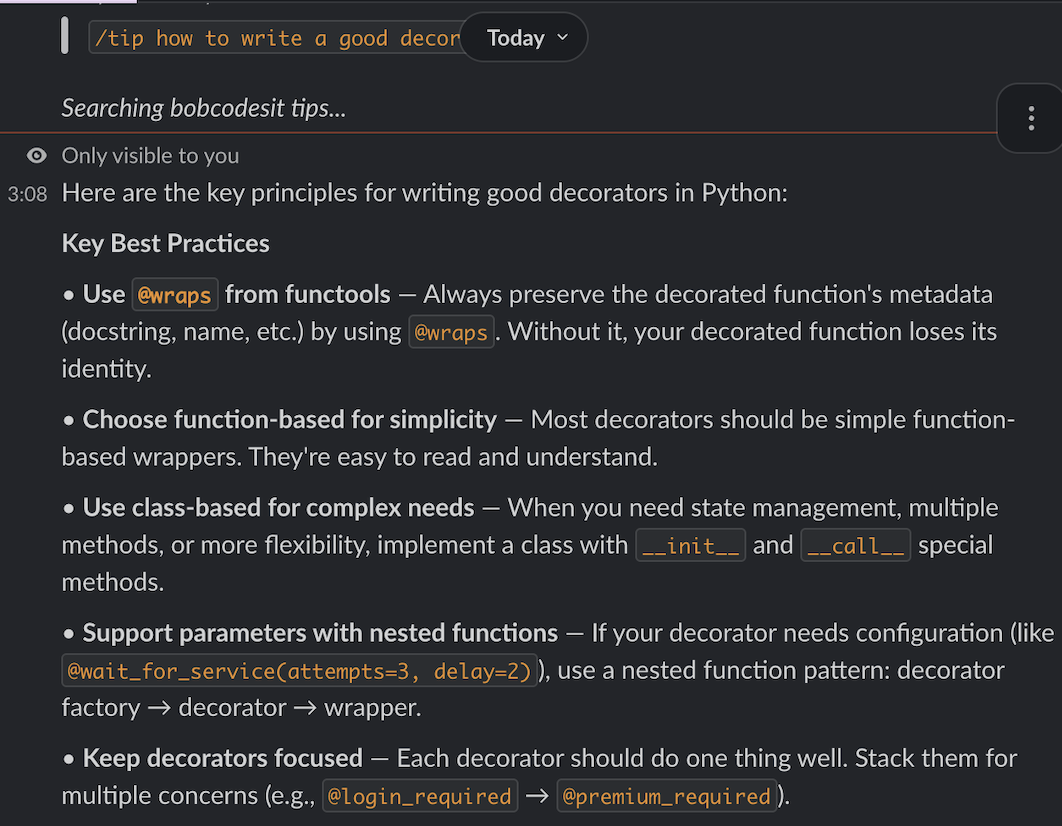
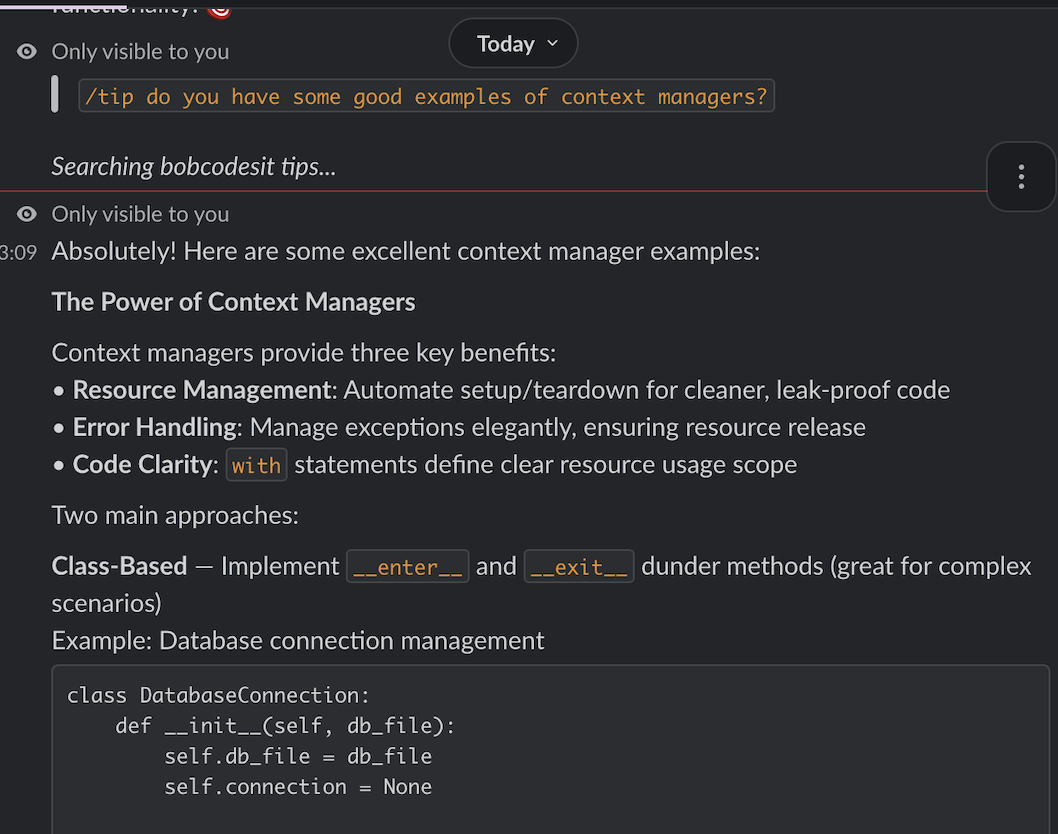
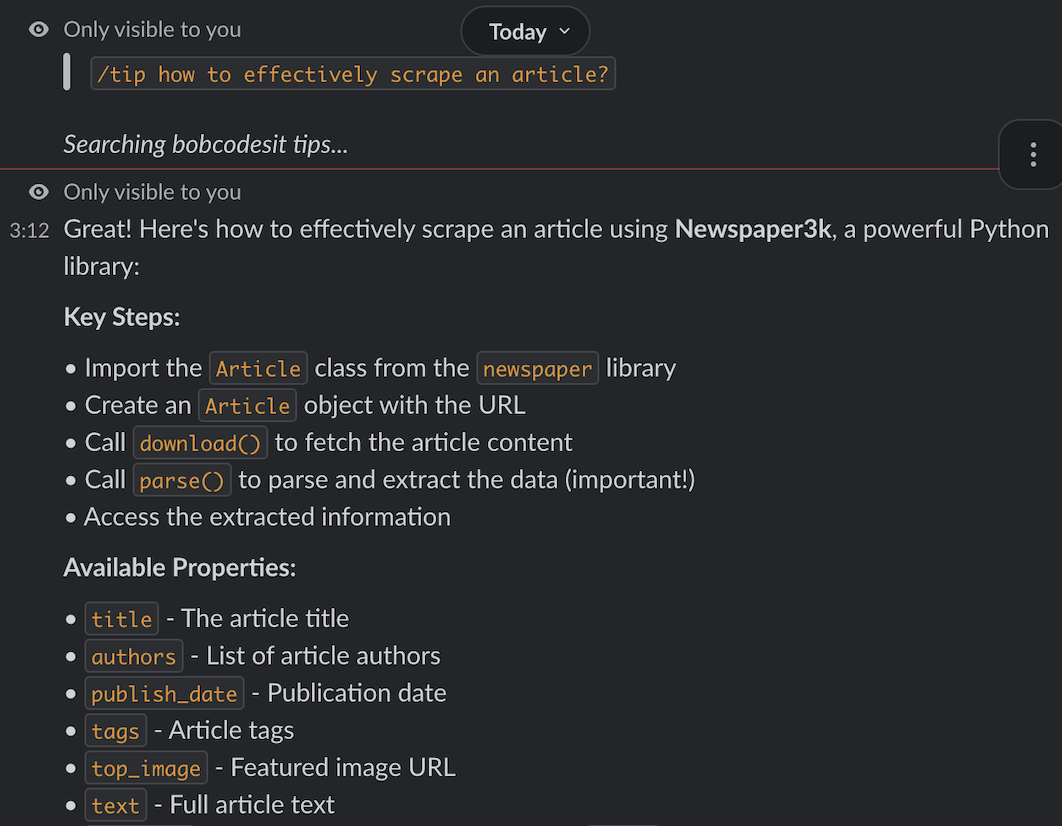
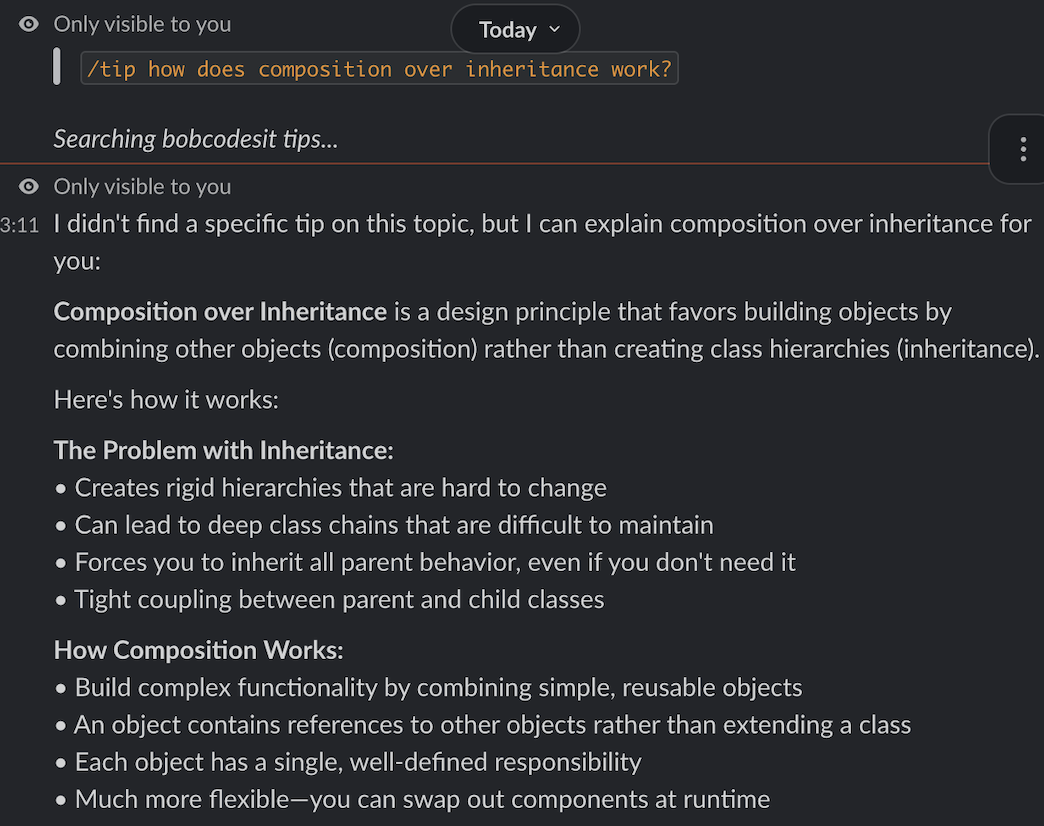
uv run python slack_bot.pyThe /tip how do generators save memory? slash command in Slack gets a real Claude response, not a keyword match. Claude reads the tips and explains the relevant ones in context. Using respond() instead of say() keeps the reply only visible to you, so it works in any channel without spamming everyone.
How to write a good decorator? /tip how to write a good decorator in Slack:
Check for tips about context managers with /tip context manager:
Check if there is any library recommendation for article scraping with /tip web scraping:
In case there is no matching tip, the bot still responds with a general answer based on the knowledge in the tips collection, rather than just saying "no results", for example:
Why bother with MCP at all?
You could point Claude at your notes directory directly, or grep in a shell script, or have the Slack bot do its own keyword matching.
The difference is the reasoning layer. When /tip how do generators save memory? arrives in Slack, Claude decides whether to call search_tips, which query to use, whether to follow up with get_tip for the best result, and how to synthesize the answer. That's not a grep, it's the same reasoning you get in Claude Code, reachable from a different interface.
The MCP server is also a reusable contract. Claude Code uses it natively over stdio. Claude Desktop uses it. Any other MCP-compliant client uses it without any new integration code. Slack isn't an MCP client, so the bot bridges the gap with the Claude API. It still connects to the same MCP server via stdio, fetching tools dynamically rather than duplicating them.
As more tools adopt MCP (editors, terminals, agents), your server becomes more valuable without changes on your end.
The MCP server is 78 lines. The Slack bot is another 120. My 240 tips are now searchable from two places I work in every day. In both cases Claude is doing the reasoning through the same MCP server, not a keyword grep or a duplicated tool definition.
Full source on GitHub: bbelderbos/mcp_tips_example.
What would you use MCP for? A personal knowledge base, a code snippet library, a recipe collection? Let me know when you build one.
AI is an accelerator, not a compass. I coach developers to ship faster and understand what they ship. See the path →